Licensing NI Vision Software
Overview
Contents
- Vision Development Module (VDM)
- Vision Acquisition Software (VAS)
- Vision Builder for Automated Inspection (VBAI)
- Vision Builder for Automated Inspection Development Toolkit (VBAI)
- Vision Development Module Run-Time Engine (VDM RTE)
- Vision Development Module Debug Deployment License (VDM DDL) – Optional for Deployed Executables
- Additional Resources
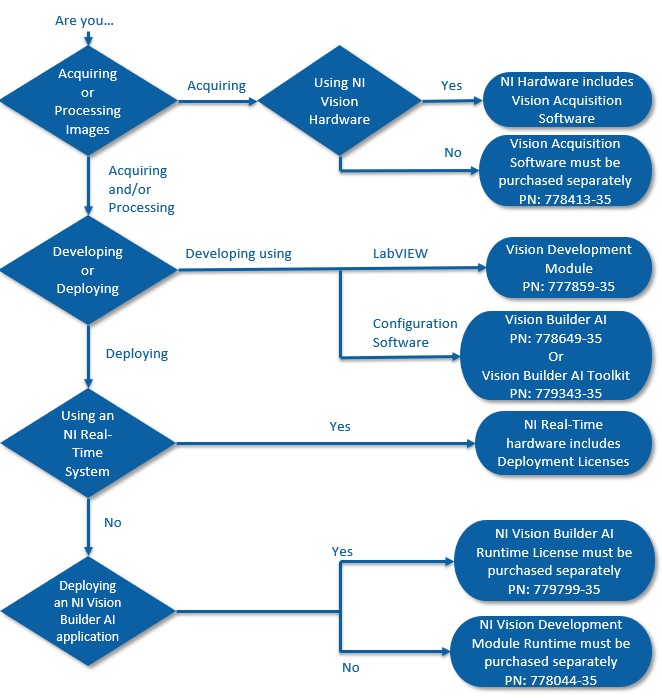
Note: for third party image acquisition devices, NI-IMAQdx driver software is required. This is included in the Vision Acquisition Software (VAS).
For further clarification on whether a Vision Acquisition Licence is required, please consult this knowledge article.
Vision Development Module (VDM)
The NI Vision Development Module full development software includes:
- The NI Vision Development Module software, which includes Vision Assistant
- A license to use the VIs and functions included in the module
- A (single) license for VAS for the same computer on which you install VDM
- A (single) license for the VDM Run-Time Engine (RTE), which allows you to run executables containing the VDM VIs and functions on one target computer (different than the development computer).
If installed but not activated, VDM will default to a 30 day trial period.
Vision Acquisition Software (VAS)
NI Vision Acquisition Software includes:
- The NI-IMAQ, NI-IMAQdx, and NI-IMAQ I/O image acquisition drivers
- A (single) license for NI-IMAQdx on one computer
Activation is only required for the NI-IMAQdx driver, which includes support for FireWire (IEEE 1394), GigE (Gigabit Ethernet), and USB (USB3 Vision or DirectShow compliant) cameras. No activation is required for NI-IMAQ and NI-IMAQ I/O.
If installed but not activated, the NI-IMAQdx driver will default to a 30 day trial period. After the 30 day trial expires, the NI-IMAQdx driver and its corresponding VIs and functions will no longer function. However, the other drivers, NI-IMAQ and NI-IMAQ I/O, and their corresponding VIs and functions will continue to work, as they do not require a license.
Once a license is purchased for VAS, upgrades are free for life. You must purchase a separate VAS license for both your development and deployment computer. There is no VAS Run-Time driver or license.
Vision Builder for Automated Inspection (VBAI)
There are three combinations of VBAI licensing:
- VBAI Full-Featured
- VBAI Full-Featured for NI Real-Time Targets
- VBAI Run-Time. For list of features available in VBAI Run-Time, refer to Vision Builder AI Run-Time Available Features.
Vision Builder for Automated Inspection includes:
- A (single) license for VAS for the same computer on which VBAI is also installed.
Vision Builder for Automated Inspection Development Toolkit (VBAI)
With the Vision Builder AI Development Toolkit, you can create custom steps for use in any Vision Builder AI inspection. The toolkit license is required to create and build new steps in LabVIEW. LabVIEW Application Builder is also required to save the custom step for distribution but the toolkit does not need to be licensed to use the built step.
Vision Development Module Run-Time Engine (VDM RTE)
A license for the NI Vision Development Module Run-Time Engine is required for deploying executables containing the VDM VIs and functions. VDM Run-Time License includes:
- A (single) license for the VDM RTE on one computer
- A (single) license for VAS on the same computer
Application deployment with VDM is based on single-seat licensing. This means that you must purchase a separate license for each deployment computer.
The VDM RTE is not recommended for computers with VDM installed. If VDM RTE is installed on a computer with VDM already activated, it does not require activation.
Once a license is purchased for VDM RTE, upgrades are free for life when using your serial number.
On systems using the Volume License Manger (VLM) where VDM is installed, executables can only run when VDM or VDM Debug Deployment License ( VDM DDL) is activated through the Volume License Server. For situations where only one developer has access to the VDM or VDM DDL license on a computer, the other users of that computer must be given access to VDM in order to run any executable containing VDM VIs and functions.
Note: As of 2013, the VDM RTE cannot be used in evaluation mode. Please contact your local sales representative to generate a temporary license file to evaluate the VDM RTE .
Vision Development Module Debug Deployment License (VDM DDL) – Optional for Deployed Executables
The VDM DDL is meant to be used in the place of the VDM RTE for applications which require debugging. To activate the VDM DDL, VDM must first be installed. Once VDM is installed, the VDM DDL should be used to activate the Debug Deployment option. The VDM DDL activates the VDM RTE automatically. If full development is desired on a computer with the VDM DDL. VDM Development license must be purchased.
On systems using the Volume License Manger (VLM) where VDM is installed, executables can only run when VDM or VDM DDL is activated through the Volume License server. For situations where only one developer has access to the VDM license on a computer, the other users of that computer must be given access to either VDM DDL or VDM in order to run any executable containing Vision functions.
Note: You will also need the LabVIEW Debug Deployment License on top of the VDM DDL to debug LabVIEW Vision Applications.