NI Instrument Simulatorのディップスイッチの設定方法
ハードウェア: GPIB>>Support Products>>NI Instrument Simulator
|
||||||||||||||||||||||||||||||||||||||||||||||||||

問題:
NI Instrument SimulatorでGPIB通信およびシリアル通信をおこなう場合、各通信においてディップスイッチの設定はどのようにすればよいですか?
解決策:
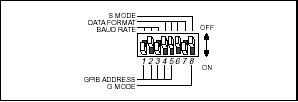
GPIB通信の設定(GPIBアドレスが2の場合)は以下のとおりです。

シリアル通信の設定の場合は以下のとおりです。
(9600bps,パリティなし,ストップビット1,データビット8ビットの場合)
シリアル通信の設定の場合は以下のとおりです。
(9600bps,パリティなし,ストップビット1,データビット8ビットの場合)
関連リンク:
製品マニュアル: NI Instrument Simulator User Manual (PDF)
添付:
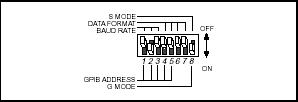 - GPIB_Switch_Setting.jpg
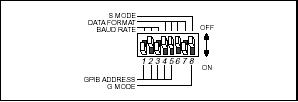 - Serial_Switch_Setting.jpg
|
||||||||||||||||||||||||||||||||||||||||||||||||||
報告日時: 10/22/2004
最終更新日: 01/26/2017
ドキュメントID: 3ELG004H