Restore the Operating System of Legacy PXI, VXI, cRIO-908x, and cDAQ-913x Controllers
Overview
This article explains the method for restoring the original operating system (OS) that was shipped with PXI 817x/818x/819x , VXIpc-770/870B, cRIO-908x, and cDAQ-913x controllers. This hardware is no longer sold by NI. It also explains how to install a different OS on the controller.
Contents
- Introduction
- Hard-Drive-Based Recovery Options (newest to oldest)
- Recovery CD
- Other OS Installation
- Additional Resources
Introduction
NI provides two methods for recovering or reinstalling the OS on an embedded controller.
Hard-Drive-Based Recovery Options (newest to oldest)
Acronis True Image OEM
For NI PXI(e) controllers running Windows 10, UEFI loader screen will appear after BIOS and before booting into Windows. Select 1.Recover to enter the Acronis utility.

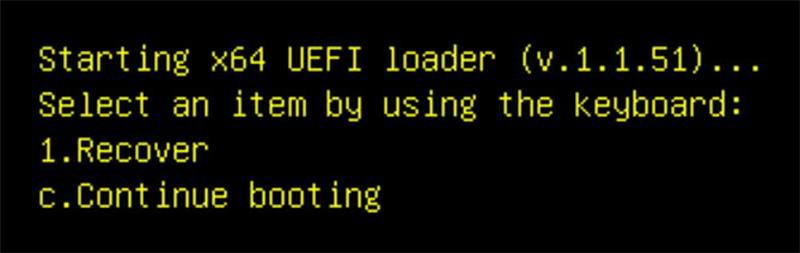
For NI PXI(e) controllers running Windows 7, press the Delete key during BIOS post during system boot. Then you will be prompted to press F4, and then you can enter the Acronis utility to reinstall from this original image.
The Acronis utility included with Windows also provides the ability to create custom backups and locate them on external USB or other attached media. Upon running the Windows Acronis program for the first time, you will be prompted to upgrade to the full version to enable features such as network backups, incremental backups, and more. This functionality is optional and is not supported by NI.
Phoenix Firstware
Phoenix Firstware is used to store a factory image of your hard drive in an inaccessible area of the drive. By changing the reported size of the disk drive, the Firstware area is hidden so other activity on the disk (including full formats) does not remove it. By tapping the F4 or Alt keys when booting, you will see the option to recover your hard drive from this original image. For more information, reference your controller's user manual.
Images Directory (Obsolete)
In older controllers, the C:\images directory was used to store the software to reinstall the OS on the controller. This method is no longer used on PXI, VXI, cRIO-908x, or cDAQ-913x controllers.
Recovery CD
Running the Recovery CD included with your controller will erase the contents of your entire hard drive and install a fresh image onto your controller. The Recovery CD may provide additional options such as choosing the file format of your system to enable dual-boot Windows/RT systems. See the Related Links section for more information on dual-booting a PXI, cRIO-908x, or cDAQ-913x controller.
Note: You must use the Recovery CD that matches the model of your controller. If you do not have the Recovery CD that matches the model of your controller, do not use this method.
Other OS Installation
NI embedded controllers are built using industry-standard chipsets and components. If you choose, you can install another operating system onto your controller though the installation and functionality of the installed OS is not guaranteed by NI. The following table provides links to a few tutorials that describe, in detail, the different means for restoring or changing the operating system on your NI embedded controller. Please follow the link to the appropriate tutorial for your embedded controller.
PXI Controller Family | VXI Controller Family |
NI 8180/8190 Series (Discontinued) | VXIpc-770/870B (Discontinued) |
NI 8170 Series (Discontinued) |
|
Note on Acronis True Image OEM: Since the image is accessible, it will be overwritten if you run your recovery CD or reformat your hard drive. Using the Recovery CD on an Acronis system will recreate the Acronis image for later hard drive restoration.
Additionally, if you are having issues detecting your USB CD/DVD-ROM by your cRIO-908x, or cDAQ-913x controller you may need to Upgrade Windows on cDAQ Controller Using a CD/DVD-ROM Drive.
Lost Media: Due to licensing regulations, NI cannot provide a replacement for lost OS media.