对National Instruments的串口卡进行端口的收发线模式设置
主要软件:
主要软件版本: 3.0
主要软件修正版本: N/A
次要软件: LabVIEW Development Systems>>LabVIEW Base Development System, Driver Software>>NI-Serial, Utility Software>>Measurement & Automation Explorer
硬件: Serial>>RS-232, Serial>>RS-485
|
||||||||||||||||||||||||||||||||||||||||||||||||||

问题:
如何对National Instruments的串口卡进行端口的收发线模式设置?
解答:
NI-VISA 3.x 和之后版本可以通过Serial Settings properties设置Wire Mode 属性. 由用户决定如何并且何时设置Wire Mode属性. 使用 Measurement & Automation Explorer (MAX) 和 LabVIEW 设置该属性的步骤如下. 你也可以参考下面的相关链接获得更多关于串口的收发模式设置以及其他方式进行设置的信息.
在开始编程之前,在MAX中可以对某个端口进行Wire Mode 属性的设置.
- 打开 MAX 并展开 Devices and Interfaces.
- 展开 Ports (Serial & Parallel) 点击你要改变Wire Mode属性的端口.
- 点击窗口底部右边的 Advanced 标签并且从Transceiver Mode 选框中选择需要的Wire Mode . 参考下面的Advance port settings tab in MAX截图.
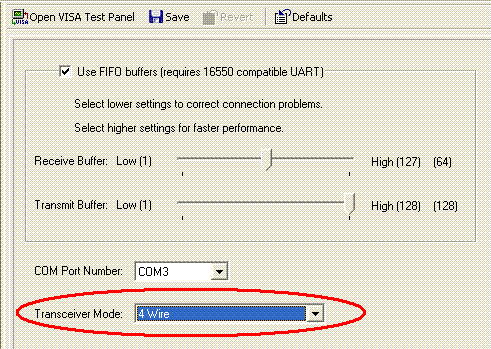
也可以在LabVIEW中使用属性节点进行编程设置.
- 在程序框图中添加一个属性节点并且连接到你想要设置Wire Mode 属性的VISA serial session . 你需要连入 VISA 资源名连线然后从属性节点上连出. 您也可以右键VISA 资源名连线来创建一个属性节点.
- Wire Mode 属性 在 Serial Settings中.
- 根据你的需要,右键单击属性节点选择写入还是读取Wire Mode 属性.
- 右键单击Wire Mode I/O创建一个常量或者控件.参考下面Wire Mode property node in LabVIEW 的截图.

相关链接:
KnowledgeBase 3BJC7JXR: Setting Up Serial Transceiver Wire Modes Programmatically in LabWindows/CVI
KnowledgeBase 2EMAARXY: How Can I Configure My Serial Board for 2- or 4-Wire Mode in LabVIEW RT?
KnowledgeBase 17M6L0TI: What Are the Different Transceiver Modes on the NI RS-485 Serial Cards?
Developer Zone Example: Testing your 485 Serial Port in 2 Wire (Half-Duplex) Mode in LabVIEW
Product Reference: Serial Settings: Wire Mode
Product Reference: Serial Settings Properties
附件:
 - MAX_SerialTranceiverMode.GIF
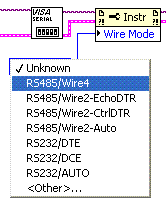 - LV_SerialTranceiverMode.GIF
|
||||||||||||||||||||||||||||||||||||||||||||||||||
报告日期: 02/10/2006
最近更新: 07/17/2009
文档编号: 3U9E2VF3