From Friday, April 19th (11:00 PM CDT) through Saturday, April 20th (2:00 PM CDT), 2024, ni.com will undergo system upgrades that may result in temporary service interruption.
We appreciate your patience as we improve our online experience.
Home
Support
¿Cómo desinstalo software de NI que no está soportado en Windows Vista con la finalidad de instalar las versiones oficialmente soportadas?
¿Cómo desinstalo software de NI que no está soportado en Windows Vista con la finalidad de instalar las versiones oficialmente soportadas?
Software Primario:
Versión de Software Primario: 8.5
Versión de Software Primario Corregido: N/A
Software Secundario: Driver Software>>NI-488.2, Driver Software>>NI-CAN, Driver Software>>NI-DAQmx Base, Driver Software>>NI-DCPower, Driver Software>>NI-DMM, Driver Software>>NI-DNET, Driver Software>>NI-FGEN, Driver Software>>NI-FieldPoint, Driver Software>>NI-HSDIO, Driver Software>>NI-IMAQ, Driver Software>>NI-Motion/FlexMotion, Driver Software>>NI-SCOPE, Driver Software>>NI-SWITCH, Driver Software>>NI-VISA, Driver Software>>NI-RIO
Problema: He instalado software de National Instruments que no está oficialmente soportado en Windows Vista en mi ordenador con Windows Vista. Me gustaría instalar ahora las versiones soportadas oficialmente, sin embargo, al ejecutar el instalador más reciente, me indica que primero desinstale versiones anteriores de software NI.

Solución: Siga los siguientes pasos para desinstalar todo el software NI no soportado:
Nota: Usuarios de NI-Serial deberían dirigirse al KnowledgeBase 46L9FRG2 cuyo enlace se adjuta más abajo antes de seguir con los siguientes pasos.
- Desinstale todo el software de National Instruments yendo a:
Start » Control Panel » Programs » Uninstall a Program » National Instruments Software » Remove.
- Reinicie su ordenador.
Ahora puede instalar el software de National Instruments que oficialmente está soportado en Windows Vista
Soluciones a problemas:
Si recibe un error similar a "Failed to remove oemXX.inf from the driver store, inf is in use" al ejecutar vistaCleanupTool.exe, siga los siguientes pasos:
- Seleccione OK, y apage la máquina.
- Extraiga todos las tarjetas o hardware de NI, incluyendo cualquier tarjeta de red Intel Pro 1000 que podría estar asociado al controlador de visión GigE.
- Encienda el ordenador y vuelva a ejecutar
vistaCleanUpTool.exe
Si previamente desinstaló todo el software NI no soportado y luego instaló el oficialmente soportado sin ejecutar primeramente vistaCleanupTool.exe, siga los siguientes pasos:
- Desinstale todo el software de NI.
- Reinicie el ordenador.
- Ejecute la aplicación
vistaCleanupTool.exe adjunta.
- Reinicie el ordenador.
- Ahora reinstale las versiones oficialmente soportadas.
Ligas Relacionadas:
KnowledgeBase 43G8SD5L: Which NI Vision Products Support Windows Vista?
KnowledgeBase 46RG5SNZ: Windows Vista Asks For Administrative Permissions When Running An Executable From LabWindows/CVI Or LabVIEW
KnowledgeBase 46L9FRG2: Upgrading from Windows XP to Vista with NI-Serial Installed
Archivos Adjuntos:
 - vistaCleanupTool.exe
 - vct2.jpg
Día del Reporte: 02/12/2007
Última Actualización: 12/21/2011
Identificación del Documento: 46BH366K
Other Support Options
Ask the NI Community
Collaborate with other users in our discussion forums
Request Support from an Engineer
A valid service agreement may be required, and support options vary by country.
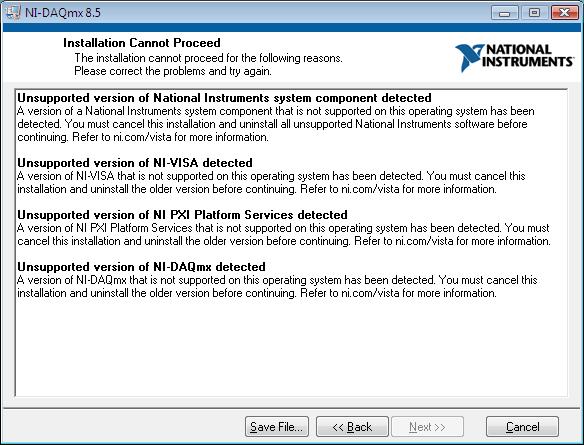 - vct2.jpg