Introduction
The Activity Compliance Log or VLA log in NI VLM contains usage information to prove your licensing compliance. You also use it to enable technical support for end users. To generate the Activity Compliance Log, complete the following steps:
Note: The Activity Compliance Log has been replaced by the VLA Log in NI VLM 3.1. However, they contain the same information.
Generating a Log For VLM 3.x
- Follow the directions in the Volume License Manager 3.x Help for Generating a VLA Log
- Select the option Send VLA Log
- Select the reason why you want to send the VLA Log.
Note: Select Other if you want to specify a custom Date range. Below you can see a 1-year range.

- Now you can save your VLA Log file to send it later on.

Generating a Log For VLM 2.1
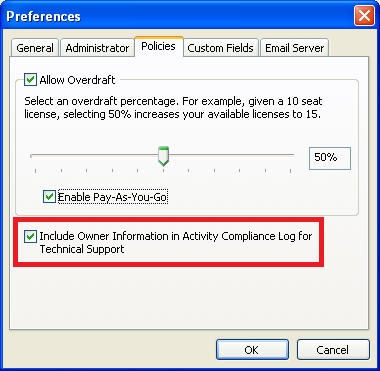
- Ensure that Include Owner Information in Activity Compliance Log for Technical Support is checked on the Policies tab in the NI VLM Preferences (Options»Preferences menu item).
- Select the Options»Save Activity Compliance Log menu item.
- Select a location where you want to save the Activity Compliance Log and click OK.
- Create an email addressed to services@ni.com with the subject line I want to send my end user information to NI so my end users are eligible for technical support.
- Navigate to where you saved the Activity Compliance Log and attach the log to your email.
Note: This article is part of the Getting Started with VLM series.
Previous Step: Creating a Disconnected or Home License